
Kling 4 AI Video Generator: Modes, Prompts and Costs for Filmmakers
Kling 4 is the newest Kling AI video generator: 3 to 30 second takes, native sound, up to 10 reference images and 5 reference videos, and a video edit mode. How each mode works, how to prompt it, and what it costs.
Short answer: Kling 4 is Kuaishou’s fourth-generation Kling AI video generator, available on fal since October 2026. One model now covers five jobs: text to video, image to video, first and last frame, reference to video, and editing an existing clip. A take runs 3 to 30 seconds at 720p or 1080p, and every take comes with sound, including lip-synced dialogue. In Frameliq it replaced Kling 3.0 and Kling O3 on October 24, 2026, and saved Kling 3 and O3 shots now open as Kling 4.
Kling 4 at a glance
| Spec | Kling 4 |
|---|---|
| Take length | 3 to 30 seconds, in whole seconds |
| Resolution | 720p or 1080p |
| Aspect ratio | 16:9, 9:16, 1:1 or 21:9 for text and reference; image modes follow the image |
| Sound | Always on: stereo ambience, effects and lip-synced dialogue |
| References | Up to 10 images, 5 videos (30 seconds in total) and 7 elements per take |
| Edit source | A clip of 3 to 30 seconds, at least 700 px on each side |
| Not available | Seed, negative prompt and a sound-off switch |
The five modes and when to use each
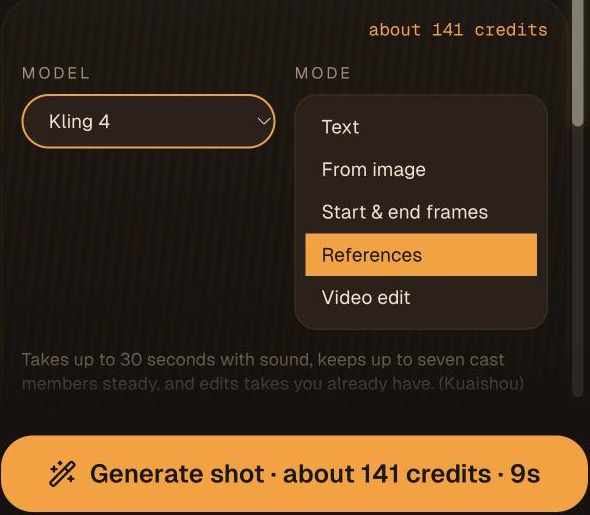
Text to video
Use it for establishing shots, inserts and anything without a recurring character. The prompt carries everything, so name the subject, the action, the camera move, the look and the sound.
Image to video
The image becomes the first frame and fixes the look. This is the mode for turning an approved storyboard frame into a shot. Describe what happens after that exact frame and name anything that must not change, such as a label, a costume or a prop.
First and last frame
Give Kling 4 a start image and an end image and it animates the move between them. It suits reveals, transitions and any shot that has to land on a set composition, for example a push-in that ends on a close-up you already designed.
Reference to video
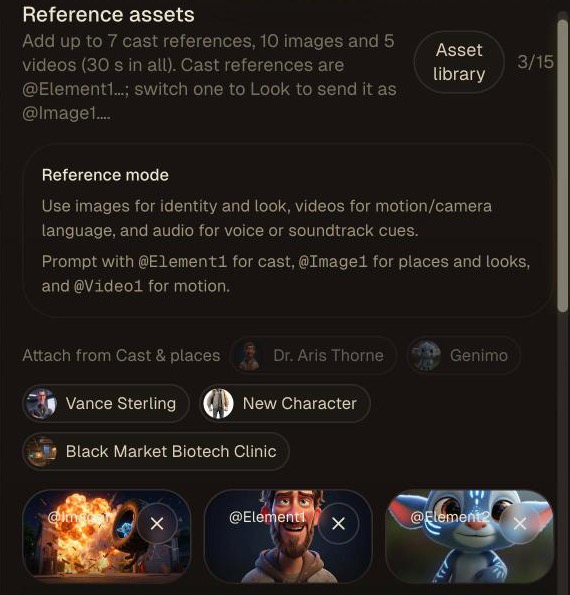
This is the headline feature for filmmakers. A take can use up to 7 elements, which are characters or objects built from a front image plus up to three extra angles, along with 10 style or location images and 5 reference videos. A reference video can drive the performance, the camera path, or both. Each reference gets a tag in the prompt:@Element1, @Image1, @Video1.
Video edit
Edit changes an existing clip and keeps its timing: swap a costume, change the weather, remove an object. The source has to be 3 to 30 seconds long and at least 700 px on each side, so a take rendered at 480p or a vertical 768p take is too small and needs a 720p render first.
How to prompt Kling 4
Kling 4 reads a prompt like a director’s note and expands it. Left alone, it may add cuts inside a take. These habits keep it on the shot you planned.
- Write in order: subject, action, camera, look, then sound.
- Say when there are no cuts. For a single shot, write “One continuous shot, no cuts.”
- Time the beats in longer takes. For a 12-second take, write a short timeline such as “0–4 seconds: …, 4–9 seconds: …, 9–12 seconds: …” with an opening, a development and a final hold.
- Give every reference one job. Open a reference prompt with a line like “@Element1 is Maya. @Image1 sets the room. @Video1 supplies the camera path only.”
- For edits, put the change first. Then list what stays fixed: the timing, the camera path, the people you are not changing and the objects they touch.
- Write the dialogue in quotes and name who says it. Sound is always generated, so a line in the prompt becomes a lip-synced line in the take.
An example for a single image-to-video shot:
Maya steps out of the lighthouse door into the wind and shields her eyes, looking out to sea. Slow push-in from a wide to a medium shot, ending on her face. Overcast dusk, cold blue light, film grain. Wind, surf and gulls; she says quietly, “It’s back.” One continuous shot, no cuts. Keep her red coat and the door unchanged.
What Kling 4 costs
On fal, Kling 4 is billed per second of output: $0.157 at 720p and $0.235 at 1080p for text, image, first and last frame, and reference takes. A 5-second take costs about $0.79 at 720p and $1.18 at 1080p. When video goes in, through a reference video or an edit, the rate drops to $0.094 or $0.141 per second, but it is charged on the input plus the output, and on at least twice the output length. A 5-second edit therefore costs about $0.94 at 720p.
Kling 4 costs about twice as much per second as H3 Max at 720p. In Frameliq a good habit is to draft a scene with a cheaper model and render the keeper shots with Kling 4. The Composer shows the cost of each shot before you render it, and one Media credit is $0.01 of generation, so a 5-second 720p Kling 4 take is about 79 Media credits.
Using Kling 4 in a film project
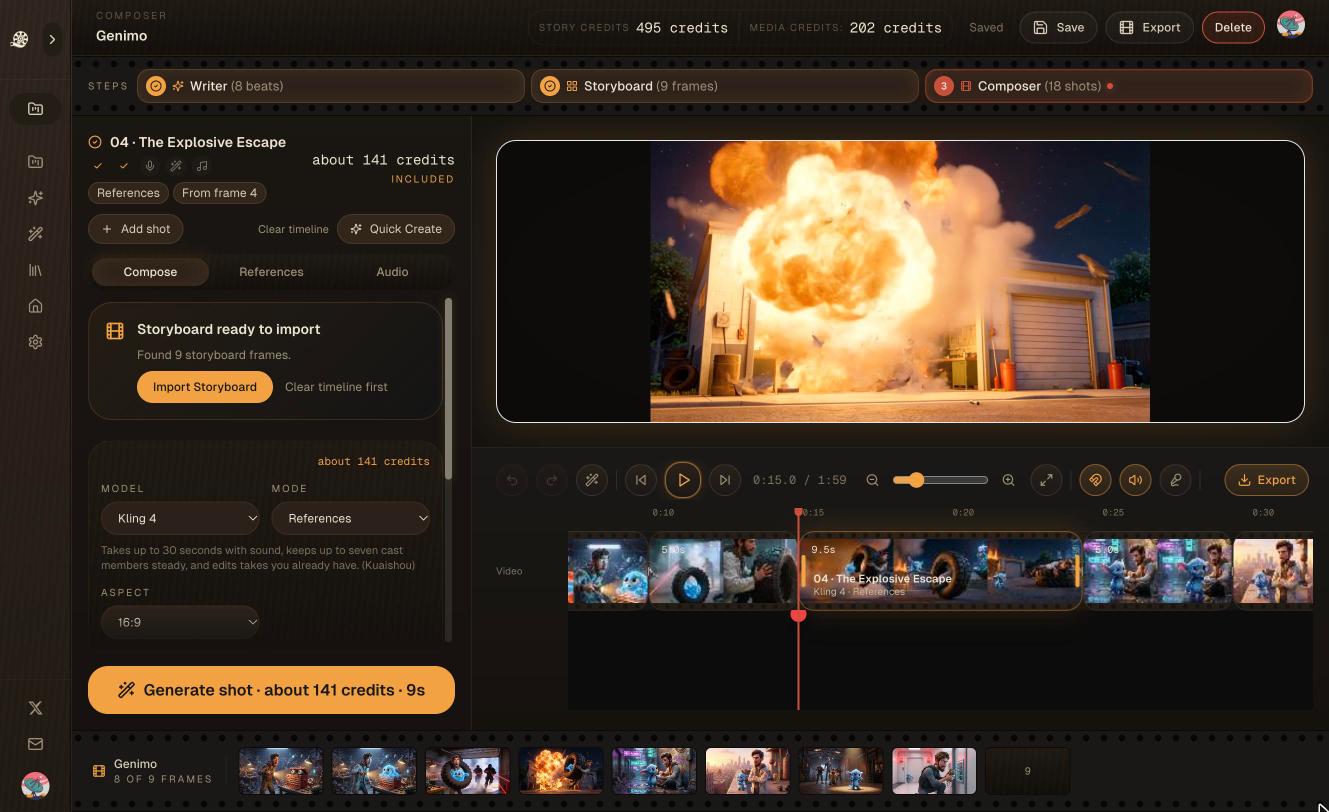
Two Frameliq details matter for Kling 4. First, cast voices: with “Use cast voices” on, each character element speaks in that character’s voice. This option needs your own fal key. Second, the Claude and ChatGPT connection can set a shot to Kling 4 and start an edit of its current take after you approve the cost. See integrations for setup.
Kling 4 vs the other models in Frameliq
| Model | Take length | Pick it for |
|---|---|---|
| Kling 4 | 3–30 s | Long takes, reference-driven shots with recurring characters, edits |
| H3 Max | 5–15 s | The default: cheaper drafts and dialogue shots, with lip sync and Extend |
| Seedance 2.5 | 4–30 s | Long takes with sound at 480p to 1080p |
| FLUX 3 Max | 5–20 s | Mid-length shots from text, a start frame, or first and last frames |
| Veo 3.1 | 4, 6 or 8 s | Short realistic shots with sound |
For a longer look at how the main families differ, read Kling vs Veo vs Sora. If you used Sora, which OpenAI shut down in 2026, see the Sora alternative guide.
FAQ
Is Kling 4 better than Kling 3?
It does more in one model. Kling 3 and Kling O3 were separate models for generation and for reference and edit work. Kling 4 does all of it, takes run to 30 seconds, and a take can use reference videos as well as images.
How long can a Kling 4 video be?
One take is 3 to 30 seconds. A film is built from many takes, which Frameliq’s Composer cuts together on a timeline with dialogue, music and effects before export.
Does Kling 4 generate sound?
Yes, always. Every take has stereo sound, and dialogue written in the prompt is lip synced. There is no option to turn sound off, so a shot meant to be silent should say so in the prompt.
Can I use my own fal key for Kling 4?
Yes. On the Creator plan Kling 4 runs on your fal key and fal bills you directly. On Creator Plus, Studio and Studio Pro it uses your included Media credits.
What happened to my Kling 3 shots?
They open as Kling 4 with the same prompt and references, and re-render at Kling 4’s price. A shot that used Kling 3 voice control loses that voice binding; turn on “Use cast voices” to voice it again.