
Can ChatGPT Make Videos? What Works in 2026, and How to Make a Film From a Chat
ChatGPT cannot generate video on its own now that Sora has shut down. Here is what it can do, and how to make a full AI film from a ChatGPT conversation with a plugin.
Short answer: no, ChatGPT cannot make a video by itself. OpenAI closed the Sora app in April 2026 and shut down the Sora API in September 2026, and it has not announced a replacement video model. ChatGPT can still do most of the work around a video: the idea, the script, the storyboard, the images and the prompts. With a plugin, it can also write all of that directly into a video tool, so the only step left is pressing generate.
This guide covers what ChatGPT can and cannot do for video today, the three practical ways to turn a chat into footage, and a step-by-step walkthrough of making a short film from one ChatGPT conversation.
What happened to Sora?
For a while the answer to “can ChatGPT generate videos” was “yes, with Sora.” That changed in 2026. OpenAI announced in March that it would discontinue Sora, closed the Sora app and website on April 26, and turned off the Sora API and the Sora 2 models on September 24. OpenAI’s deprecations page lists no replacement, and TechCrunch covered the announcement.
So if you search for a “ChatGPT video generator” today, what you will find are other video models that ChatGPT can help you drive. Those models are good. Seedance 2.5, Veo 3.1, Kling 3.0, Wan 3 and MiniMax H3 all generate clips with sound, and some run for 30 seconds in one take.
Three ways to make a video with ChatGPT
1. Ask for prompts, then paste them into a video model
The simplest route. Ask ChatGPT to write a shot list with one prompt per shot, then paste each prompt into a video generator. It works for a single clip. It gets slow for anything longer, because you carry every prompt across by hand and nothing keeps the character or the location the same from one clip to the next.
2. Generate images in ChatGPT, then animate them
ChatGPT Images makes strong stills. You can generate a frame for each shot, download it, and feed it to an image-to-video model. You get more control over the look, but you are still moving files between tools and rebuilding your character in every image.
3. Connect a plugin and let ChatGPT write into a film project
ChatGPT plugins let it use other apps directly. With the Frameliq plugin, ChatGPT creates a film project and writes every stage into it: story, characters, places, screenplay, a storyboard plan and a motion prompt for each shot. The project keeps reference portraits for each character and place, so the cast looks the same in every frame. You then generate the stills, video and voices in Frameliq and export the film.
This is the route that scales past one clip, and it is the one the rest of this guide walks through.
How to make a film from a ChatGPT conversation
Step 1: Add the plugin
You need a paid Frameliq plan and ChatGPT Plus, Pro, Business, Enterprise or Edu on the web. In the ChatGPT sidebar open Plugins, choose Add → Create MCP App, and paste the Frameliq server address. The exact fields and the client ID are on the integrations page. Setup takes about two minutes and you only do it once.
Step 2: Ask for a film, one stage at a time
Pick Frameliq from Plugins below the message box, or type @Frameliq, and describe the film. Ask it to stop after the logline. A film is easier to steer at the start than after twelve scenes are written. A prompt that works well:
Make a two-minute sci-fi short about a lighthouse keeper who picks up a signal. Stop after the logline so I can check it.
Step 3: Let it write the cast, the script and the storyboard
Once you approve the direction, ChatGPT writes the characters and places, then the beats, then the screenplay scenes with dialogue. After that it plans the storyboard: a frame prompt, a camera and the cast for every panel. It follows Frameliq’s craft guidelines at each stage, such as how to describe a character so they look the same in every frame.
If you already have a screenplay, paste it and ask ChatGPT to import it as written. The import is word for word. Nothing is rewritten.
Step 4: Generate in Frameliq
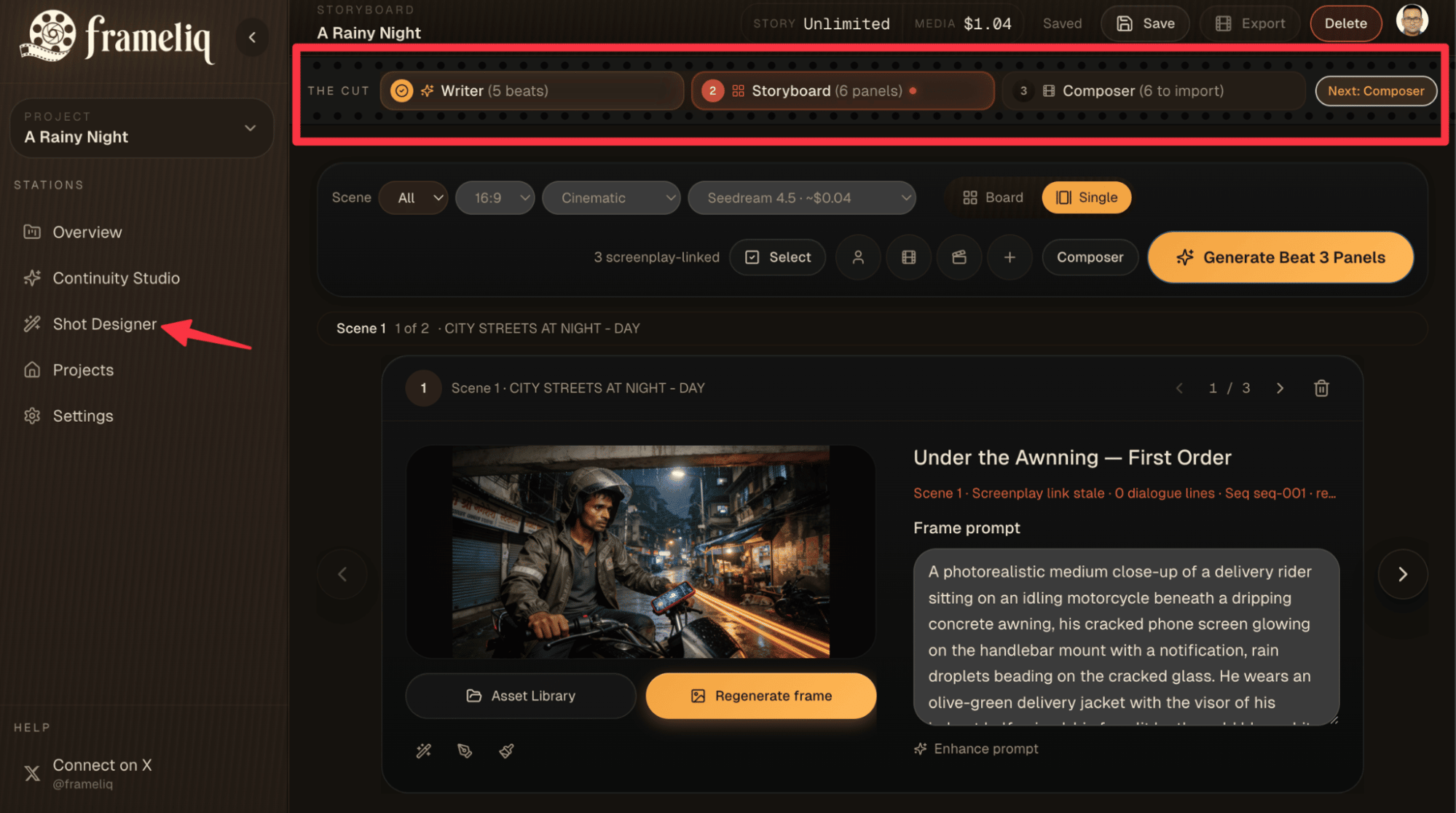
ChatGPT sends you a link to the project. In Frameliq you generate the character portraits and storyboard stills, import the storyboard into Composer, and generate each shot with the video model you want. Then add voices, lip sync and music, and export. Our short film tutorial shows these screens in detail.
It also works on a film you already started
ChatGPT can read an existing Frameliq project and improve it. Useful requests:
- “Review my latest project and list the five weakest shots before you change anything.”
- “Rewrite every Composer prompt in this project for Kling 3.0, keeping the same characters and lighting.”
- “This character’s look drifts between scenes. Fix the descriptions so they match.”
Every change gets a change id, and you can ask ChatGPT to undo any of them for 30 days. Text you edited in the app after ChatGPT last read the project is never overwritten.
What it costs
The writing runs on your ChatGPT subscription, so it uses none of your Frameliq Story credits. Generating images, video and voices happens in Frameliq and uses your Media credits, or your own fal key on the Creator plan. Paid Frameliq plans start at $19 a month, and Creator Plus at $29 a month includes Media credits so you do not need a fal account.
FAQ
Can ChatGPT generate videos for free?
No. ChatGPT has no built-in video generator on any plan now that Sora is closed. The free plan can still write scripts and prompts that you take to a video tool.
Does ChatGPT Plus include a video generator?
Not one made by OpenAI. Plus does let you add plugins, including custom ones, and that is how ChatGPT can drive a video tool such as Frameliq.
Can ChatGPT create videos from a script?
It can turn a script into everything a video needs: scenes, shots, storyboard prompts and motion prompts. The footage itself comes from a video model. With the Frameliq plugin, ChatGPT imports your script word for word and plans the storyboard, and you generate the video in Frameliq. See our guide to turning a script into a storyboard.
Can the Frameliq plugin start a video generation from ChatGPT?
No. The plugin writes text and prompts only. You start every generation yourself inside Frameliq, so nothing spends your credits without you seeing it.
Does this work with Claude too?
Yes. Claude connects to the same Frameliq server. See can Claude make videos for the Claude setup.